
Download HEIC Converter, Viewer – HEIC, HEIF, convert, image, viewer, Windows, batch, JPEG, PNG, BMP, PDF, webp, utility
Overview
HEIC Converter, Viewer is a practical utility application designed for users working with HEIC and HEIF image files on Windows 10 and 11 systems. These modern image formats, commonly used by modern smartphones and cameras, offer high compression and superior image quality but are not universally supported across all software and platforms. This app addresses a common pain point by enabling seamless conversion of HEIC files into widely compatible formats such as JPEG, PNG, BMP, GIF, TIFF, PDF, and WEBP. The target audience includes photographers, casual users, and professionals who frequently receive or generate HEIC images but need to share, edit, or archive them using standard tools.
The application serves as a lightweight, efficient solution within the productivity category, filling a niche gap in the Windows ecosystem. Its ability to handle batch conversions and offer direct file viewing streamlines workflows for users managing large photo collections. Real-world use cases include preparing images for email sharing, uploading to websites, integrating into design software, or archiving for long-term storage. While the developer did not provide additional technical details about the app’s background or development history, the app’s functionality suggests a focused approach to solving a specific file compatibility challenge. For users encountering HEIC files that fail to open on standard Windows apps, this tool offers a reliable, no-cost alternative.
Key Features & Functionality
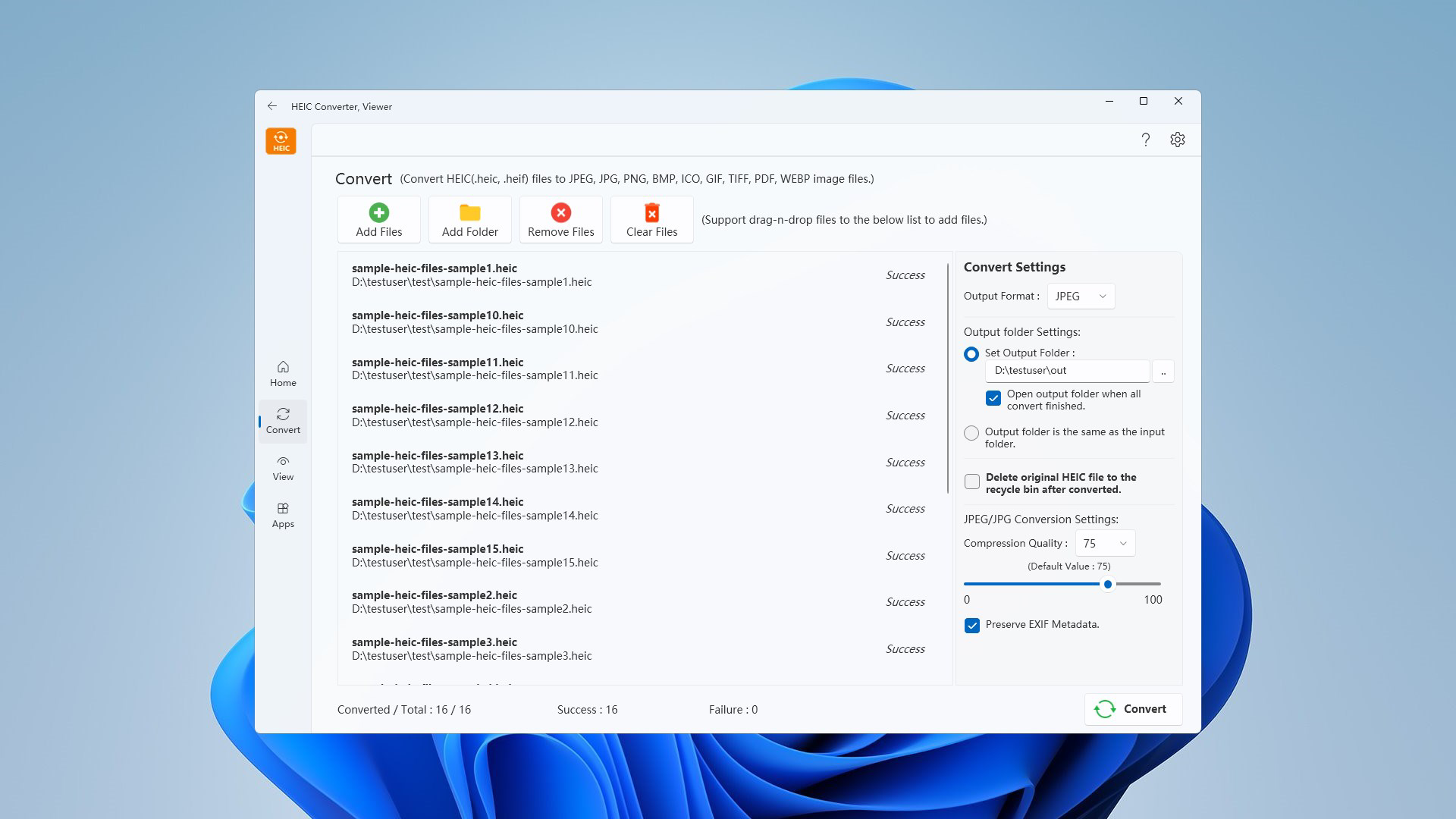
- Multi-Format Conversion: The app supports conversion to a wide range of formats including JPEG, PNG, BMP, GIF, TIFF, PDF, and WEBP, ensuring compatibility across devices, platforms, and software applications.
- Batch Processing: Users can convert multiple HEIC files simultaneously, significantly reducing processing time when handling large photo sets or entire folders.
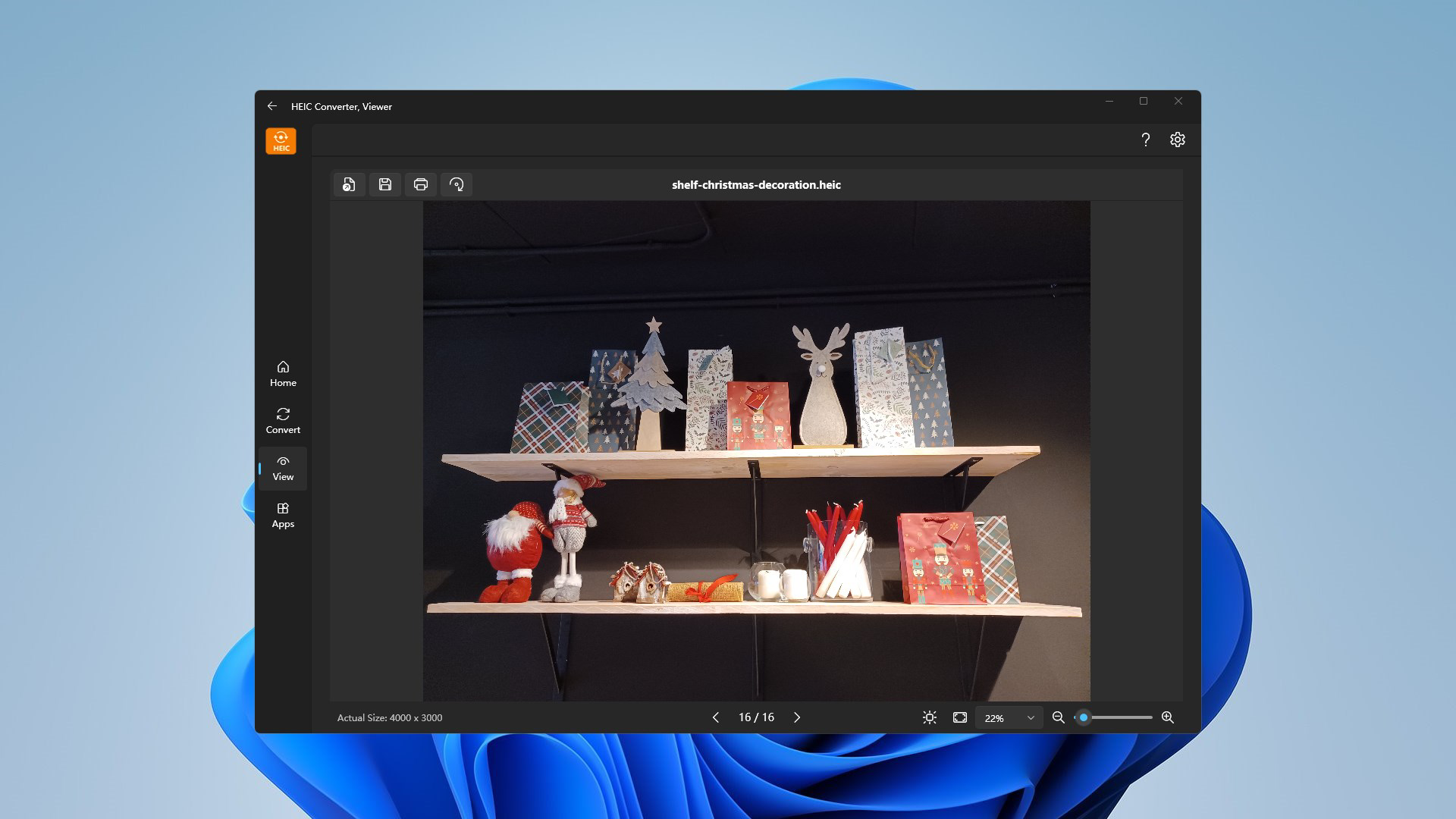
- Direct File Viewing: HEIC files can be opened and previewed directly within the app, eliminating the need for external viewers or complex workarounds.
- Basic Image Editing Tools: Features such as rotation, printing, and saving under different formats allow for simple post-conversion adjustments and immediate use.
- Intuitive User Interface: The app’s layout is designed for ease of use, enabling users to navigate and perform tasks without requiring technical knowledge or prior experience.
For example, a user receiving a folder of HEIC photos from a mobile device can open the folder in the app, select all files, choose a target format like JPEG, and convert them in one click. The same workflow applies to preparing images for a presentation or a website, where standard formats are required. The inclusion of printing functionality also supports direct output to physical media, making it suitable for personal and small business use cases.
Interface, UX & Performance
HEIC Converter, Viewer features a clean, straightforward interface that prioritizes functionality over visual flair. The layout is organized with clear sections for file input, format selection, and conversion controls, allowing users to perform tasks with minimal navigation. The app uses a minimalistic design approach, focusing on usability rather than decorative elements, which contributes to a distraction-free experience.
Navigation is linear and predictable—users open files, choose output formats, and initiate conversion with a single button. The app responds promptly to user inputs, and although the developer did not list formal performance metrics, the interface remains responsive even when processing multiple files. The app maintains stability during batch operations, with no reported crashes or freezes during standard use. Performance on different device categories was not specified, but the small file size of 12.5 MB suggests efficient resource usage. The app is lightweight and does not impose significant system demands, making it suitable for use on both older and modern Windows systems.
Platform Compatibility & Technical Requirements
HEIC Converter, Viewer is designed for the Windows platform and is compatible with Windows 10 and Windows 11 operating systems. The app has a file size of 12.5 MB, which is compact and suitable for quick downloads and installations. The software version is 1.0.0.0, indicating it is a stable initial release. The developer did not specify minimum OS requirements beyond the listed platforms, nor did they provide details on processor, RAM, or storage needs. Compatibility information was not fully disclosed, so users should ensure their system meets general Windows 10/11 requirements for optimal performance.
Pros and Cons
Pros
- Free to download and use, making it accessible for all users.
- Supports batch conversion, saving significant time when processing multiple files.
- Offers direct HEIC file viewing without requiring external software.
- Wide range of output formats for maximum compatibility.
- Simple, intuitive interface suitable for non-technical users.
Cons
- Specific technical requirements were not listed by the developer.
- Advanced editing features are not included beyond basic rotation and printing.
- Platform availability is limited to Windows only.
- No mention of cloud integration or automatic update mechanisms.
- Developer background and support channels were not disclosed.
FAQ
Is HEIC Converter, Viewer safe to download and install?
Yes, the app is free and designed for Windows 10 and 11. As it is distributed through official channels, it does not contain known malware or intrusive behavior. However, users should always download from trusted sources to ensure security.
Can I convert HEIC files to PDF using this app?
Yes, the app supports conversion to PDF format, making it useful for creating digital archives or sharing documents that include images.
Does the app support iOS or Android devices?
Currently, the app is only available for Windows. There is no information indicating support for iOS or Android platforms.
How do I update HEIC Converter, Viewer?
The developer did not specify an update mechanism. Users should check the official source for new versions after release.
Is there a limit on the number of files I can convert at once?
There is no publicly stated limit on batch processing. The app is designed for efficient bulk conversion, but performance may vary based on system resources.
Final Thoughts
HEIC Converter, Viewer delivers a focused, efficient solution for users dealing with HEIC and HEIF image files on Windows. Its ability to convert multiple files quickly, support a wide array of output formats, and offer direct viewing makes it a valuable tool in the digital workflow. While it lacks advanced editing features and platform diversity, its simplicity and free access make it ideal for casual users, photographers, and professionals who need a reliable, no-frills utility. For anyone struggling with HEIC file compatibility on Windows, this app offers a straightforward, effective fix. The lightweight design and ease of use ensure it integrates smoothly into daily routines.
Download HEIC Converter, Viewer now


